Subagents, Hooks, Scheduled Tasks, Agent Management, Voice, and Much More

Bài viết được biên dịch tự động bởi Aha! Mind Socratic Engine. Nguồn bài viết: Link gốc
Core Agent Features
Subagents
Antigravity now supports subagents beyond just the single specialized browser subagent. Subagents are now modular, specialized, or blank-slate assistant agents spawned programmatically by the main agent. They can be built-in roles, generic clones (take on the same prompt and environment as the main agent), or dynamically registered on the fly (i.e. the main agent defines the subagent’s goal as required by the currently active task). Subagents inherit tool configurations and security permissions from the main agents, ensuring they have the rights to perform the designated tasks, but no more.
Subagents allow for parallelization with workspace isolation, meaning chunkier tasks get completed quicker, and often better since the main agent’s context window is not polluted with multiple active threads of work.
Asynchronous Task Management
Historically, some operations (ex. installing npm packages) would take a long time and block the agent from doing future work (ex. writing the application code). Antigravity’s agents now support asynchronous task management, which means that these long-running operations are offloaded to a background process so they do not block the main agent's active loop or the user interface.
Subagents can also be run as asynchronous background tasks! In such a world, the main agent’s handler invokes the subagents and immediately yields control back to the user. The background task sets up an intercepting message client to catch and stream subagent responses back to the main agent’s progress log in real-time. The background task then loops and polls the subagent states periodically. Once all subagents have finished their execution, the background task concludes.
JSON Hooks
Hooks allow users to execute custom local shell scripts at critical stages of an Antigravity agent's execution cycle, such as before a tool execution (can help customize arguments), after a tool execution (useful for logging), before a model call (to inject system instructions), after a model call (to override exit rules), or at agent loop stopping conditions (to force checks or block termination). Antigravity now supports both global hooks and workspace-specific hooks, with the latter taking precedence if it exists, stored in json files. See the documentation for details on schemas and expected file locations.
Agent Management
We are introducing the core agent management primitive of a “project.” A project controls the settings (ie. how should the agent behave overall?), available resources (ie. what does the agent have access to?), and permissions (ie. is the agent allowed to take a certain action?) for all agents that are invoked within that project.
Since agents are no longer tied to a single repository for organization and management reasons, users can make multiple local folders available to the agents in a particular project. Projects allow users to have appropriately scoped settings and permissions for different agents, as opposed to requiring the user to adopt the most broad permissions out of any task for all agents. By default, each project adopts your global permissions. These can be augmented at the project level, and settings must be explicitly set at the project level. The default settings are an Antigravity-defined set of standard, conservative settings.
If you have a simple one-off task that doesn’t require a project, you can also start a “standalone” agent (using “New Conversation” without selecting a project). These agents will adopt your global permissions and the Antigravity-defined standard settings, with the resulting conversations appearing in a separate section in the left side panel.
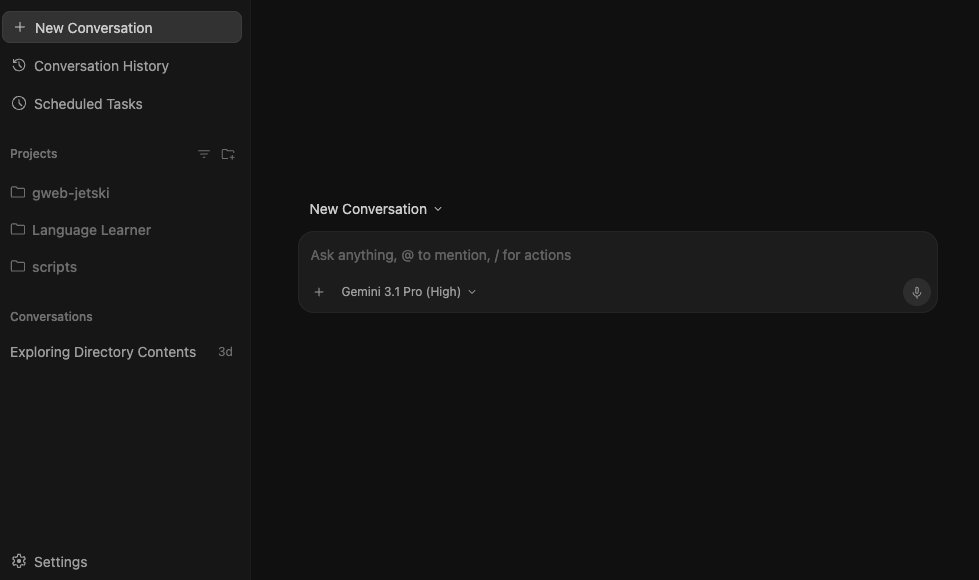
Standalone conversations are grouped separately on the left side panel.
Speaking of the left side panel, it has been revamped to allow for easier sorting and identification. You can now group conversations by project, status, or recency, change the display name of projects, and toggle on worktree names. Speaking of which, Antigravity 2.0 comes with native Git worktree support! Just select “New Worktree” when starting a conversation, and Antigravity will handle first provisioning a worktree in the background before starting the conversation in that new worktree path, keeping your active directory clean. Fun fact: if the main agent delegates to multiple subagents that need to work in isolation, it autonomously creates the worktrees for those conversations and handles cleanup automatically.
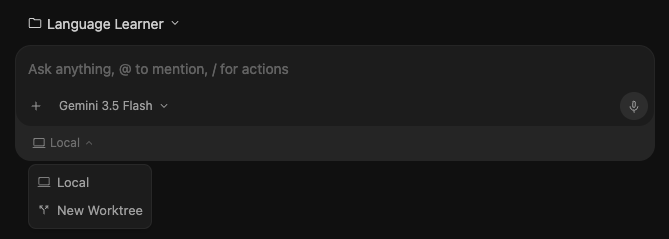
Native Git worktrees can be created easily when starting a new conversation.
Scheduled Tasks
Scheduled Tasks allow you to set crons for prompts that you would like agents to tackle periodically, without requiring your manual prompting or invocation. These could be for daily digests on open pull requests, hourly checks on live deployments, monthly reports on system architecture changes, and more.
You simply set the schedule, prompt, and project, and the agents will launch in the background accordingly, with resulting conversations appearing in the sidebar. You can continue interacting with any of these agents, allowing for a seamless handoff from asynchronous to human-in-the-loop:
Agents invoked by Scheduled Tasks are fixed to use Gemini 3.5 Flash, and we will explore adding model selection in the future.
Voice
Studies show that humans average 50 words-per-minute by typing and 150 words-per-minute by talking. More and more Googlers are adopting voice as their preferred input modality. In Antigravity 2.0, we are introducing live transcription using the latest Gemini Audio models to all tiers. Just click the mic icon next to text input boxes in the product and prompt away. One of the most powerful aspects of the new Gemini Audio model is that it is able to convert rambling speech into clearly phrased text. Now you don’t have to spend time on stylistic edits of the input before sending the prompt to the model. You are also able to make any edits before sending the prompt if you want to add additional information or there were minor errors in the transcription.

play_arrow
Live voice transcription.
New Slash Commands
We are also introducing a number of new “slash commands,” which are quick ways to provide additional guidance to the agent directly in the prompt box.
- /goal — Tells the agent to run until the specified task is completely finished, not asking for intermediate input from the user. The agent will automatically approve its own implementation plan, not ask for clarifications, and will return once it determines that the task has been completed.
- /grill-me — To some degree, agents are only as good as the prompts provided to them, and it is common for users to miss important details or to overlook providing critical guidance. With this command, the agent will ask clarification questions back to the user to align on the specific details of the task specification and plan before starting to implement.
- /schedule — Run a prompt as a one-time event in the future (capped at 15 minutes) or on some recurring schedule (via Scheduled Tasks). Just provide details on the desired schedule as natural language in the prompt. An example of a one-time call would be
/schedule in 5 minutes check if the build has finishedwhile you can set a cron like/schedule every hour run the health check script, up to 3 times. - /browser — One of the most loved features of Antigravity is the ability for the agent to autonomously launch, actuate, and observe the browser via a specialized subagent. This has been particularly helpful for users building zero-to-one apps. However, we have also heard the feedback that the main agent was still not capable enough to determine exactly when to be using the browser (as opposed to using other tools such as web search). This led to frustration where the browser got in the way of the user, especially when the human was in the loop. So, we are moving browser use to a slash command. When used, the agent will diligently use the browser, and when not, it will not consider browser-related tools at all. We recognize that this puts some burden back to the user to remember to use /browser, but we believe this is the appropriate design pattern until we get a stronger signal on the main agent’s ability to do so autonomously.
Looking Forward
This was not even the full list. We put in a significant amount of work on general UI polish, built a lot of new custom UI/UX for the new agent features, and worked on performance improvements to make your experience as snappy as possible.
This is also just the start. There are many ways that Antigravity can continue to extend: non-code resources, remote environments, additional surfaces, etc. We are exploring them all, keeping a clear eye on security and trust as we do so.
Try these features out in Antigravity 2.0 today:
Made by Anh Tu - Share to be share