[Mastering NodeJS - PACKT] Từ trang 42 đến 70

Đây là nội dung được trích xuất từ "Mastering NodeJS - PACKT" (Tác giả: Unknown Author). Bài được extract tự động bởi Aha! Mind Interpreter.
The best way to predict the future is to invent it.
— Alan Kay
Eliminating blocking processes through the use of event-driven, asynchronous I/O is Node's primary organizational principle. We've learned how this design helps developers in shaping information and adding capacity: lightweight, independent, and share-nothing processes communicating through callbacks synchronized within a predictable event loop.
Accompanying the growth in the popularity of Node is a growth in the number of well-designed evented systems and applications. For a new technology to be successful, it must eliminate existing problems and/or offer to consumers a better solution at a lower cost in terms of time or effort or price. In its short and fertile lifespan, the Node community has collaboratively proven that this new development model is a viable alternative to existing technologies. The number and quality of Node-based solutions powering enterprise-level applications provide further proof that these new ideas are not only novel, but preferred.
In this chapter we will delve deeper into how Node implements event-driven programming. We will begin by unpacking the ideas and theories that event-driven languages and environments derive from and grapple with, in an effort to clear away misconceptions and encourage mastery. Following this introduction, more detail on how timers, callbacks, I/O events, flow control, and the event loop are implemented and used will be laid out. Theory will be practiced as we build up a simple but exemplary file and data-driven applications, highlighting Node's strengths, and how it is succeeding in its ambition to simplify network application designs.
Understanding Asynchronous Event-Driven Programming
Broadcasting events
It is always good to have an accurate understanding of the total eventual cost of asking for a service to be performed.
I/O is expensive. In the following chart (taken from Ryan Dahl 's original presentation on Node) we can see how many clock cycles typical system tasks consume. The relative cost of I/O operations is striking.
L1 cache 3 cycles
L2 cache 14 cycles
RAM 250 cycles
Disk 41,000,000 cycles
Network 240,000,000 cycles
The reasons are clear enough: a disk is a physical device, a spinning metal platter that buses data at a speed that cannot possibly match the speed of an on-chip or near-chip cache moving data between the CPU and RAM (Random Access Memory). Similarly, a network is bound by the speed in which data can travel through its connecting "wires", modulated by its controllers. Even through fiber optic cables, light itself needs 0.1344 seconds to travel around the world. In a network used by billions of people regularly interacting across great distances, this sort of latency builds up.
In the traditional marketplace described by an application running on a blocking system the purchase of a file operation requires a significant expenditure of resources, as we can see in the preceding table. Primarily this is due to scarcity: a fixed number of processes, or "units of labor" are available, each able to handle only a single task, and as the availability of labor decreases, its cost (to the client) increases.
The breakthrough in thinking reflected by Node's design is simple to understand once one recognizes that most worker threads spend their time waiting—for more instructions, a sub-task to complete, and so on. For example, a process assigned to service the command format my hard drive will dedicate all of its allotted resources to managing a workflow something like the following:
-
Communicate to a device driver that a format request has been made
-
Idle, waiting for an "unknowable" length of time
-
Receive the signal format is complete
-
Notify the client
-
Clean up; shut down
[ 26 ]
Chapter 2
In the preceding figure we see that an expensive worker is charging the client a fixed fee per unit of time regardless of whether any useful work is being done (the client is paying equally for activity and idleness). Or to put it another way, it is not necessarily true, and most often simply not true, that the sub-tasks comprising a total task each require identical effort or expertise, and therefore it is wasteful to pay a premium price for such cheap labor.
Sympathetically, we must also recognize that this worker can do no better even if ready and able to handle more work—even the best intentioned worker cannot do anything about I/O bottlenecks. The worker here is I/O bound .
A blocking process is therefore better understood as an idle process, and idle processes are bottlenecks within the particular task and for the overall application flow. What if multiple clients could share the same worker, such that the moment a worker announces availability due to an I/O bottleneck, another job from another client could be started?
Node has commoditized I/O through the introduction of an environment where system resources are (ideally) never idle. Event-driven programming as implemented by Node reflects the simple goal of lowering overall system costs by encouraging the sharing of expensive labor, mainly by reducing the number of I/O bottlenecks to zero. We no longer have a powerless chunk of rigidly-priced unsophisticated labor; we can reduce all effort into discrete units with precisely delineated shapes and therefore admit much more accurate pricing. Identical outlays of capital can fund a much larger number of completed transactions, increasing the efficiency of the market and the potential of the market in terms of new products and new product categories. Many more concurrent transactions can be handled on the same infrastructure, at the same cost.
If the start, stop, and idle states of a process are understood as being events that can be subscribed to and acted upon we can begin to discuss how extremely complex systems can be constructed within this new, and at heart quite simple to grasp, model.
What would an environment within which many client jobs are cooperatively scheduled look like? And how is this message passing between events handled?
[ 27 ]
 Understanding Asynchronous Event-Driven Programming
Collaboration
The worker flow described in the previous section is an example of a blocking server. Each worker is assigned a task or process, with each process able to accept only one request for work. They'll be blocking other requests, even if idling:
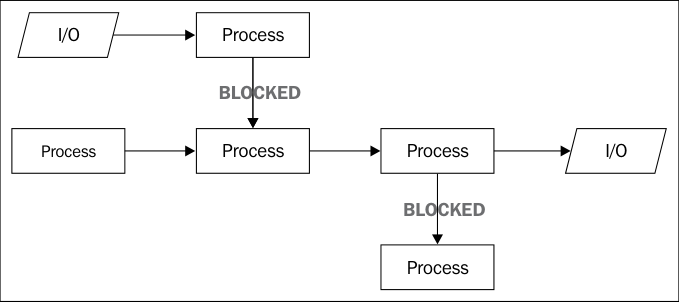
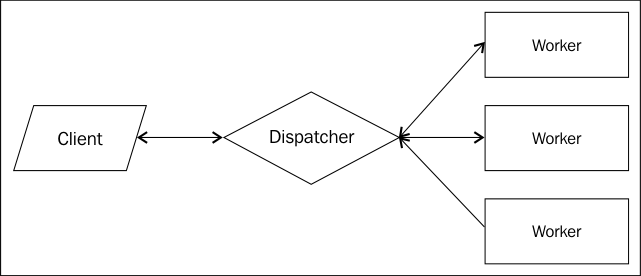
What would be preferable is a collaborative work environment, where workers could be assigned new tasks to do, instead of idling. In order to achieve such a goal what is needed is a virtual switchboard, where requests for services could be dispatched to available workers, and where workers could notify the switchboard of their availability.
One way to achieve this goal would be to maintain the idea of having a pool of available labors, but improving efficiency by delegating tasks to different workers as they come in:
[ 28 ]
Chapter 2
One drawback to this method is the amount of scheduling and worker surveillance that needs to be done. The dispatcher must field a continuous stream of requests, while managing messages coming from workers about their availability, neatly breaking up requests into manageable tasks and efficiently sorting them such that the fewest number of workers are idling.
Perhaps most importantly, what happens when all workers are fully booked? Does the dispatcher begin to drop requests from clients? Dispatching is resource-intensive as well, and there are limits even to the dispatcher's resources. If requests continue to arrive and no worker is available to service them what does the dispatcher do? Manage a queue? We now have a situation where the dispatcher is no longer doing the right job (dispatching), and has become responsible for bookkeeping and keeping lists, further diminishing operational efficiency.
Queueing
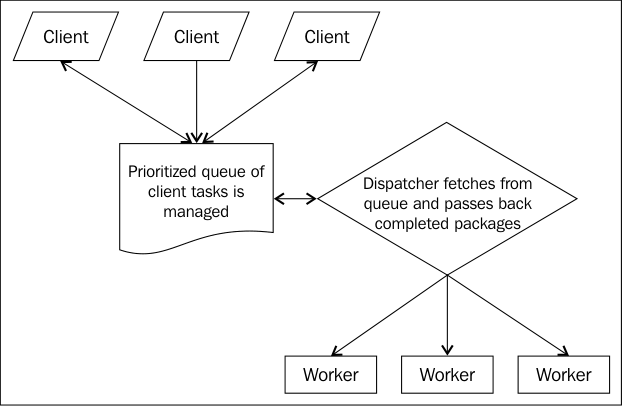
In order to avoid overwhelming anyone, we might add a buffer between the clients and the dispatcher.
This new worker is responsible for managing customer relations. Instead of speaking directly with the dispatcher, the client speaks to the services manager, passing the manager requests, and at some point in the future getting a call that their task has been completed. Requests for work are added to a prioritized work queue (a stack of orders with the most important one on top), and this manager waits for another client to walk through the door. The following figure describes the situations:
[ 29 ]
Understanding Asynchronous Event-Driven Programming
When a worker is idle the dispatcher can fetch the first item on the stack, pass along any package workers have completed, and generally maintain a sane work environment where nothing gets dropped or lost. If it comes to a point where all the workers are idle and the task queue is empty, the office can sleep for a while, until the next client arrives.
This last model inspires Node's design. The primary modification is to occupy the workers' pool solely with I/O tasks and delegate the remaining work to the single thread of V8. If a JavaScript program is understood as the client, Node is the services manager running through the provided instructions and prioritizing them. When a potentially blocking task is encountered (I/O, timers, and streams) it is handed over to the dispatcher (the libuv thread pool). Otherwise, the instruction is queued up for the event loop to pop and execute.
Listening for events
In the previous chapter we were introduced to the EventEmitter interface. This is the primary event interface we will be encountering as we move chapter to chapter, as it provides the prototype class for the many Node objects exposing evented interfaces, such as file and network streams. Various close, exit, data, and other events exposed by different module APIs signal the presence of an EventEmitter interface, and we will be learning about these modules and use cases as we progress.
Instead, the primary purpose of this section is to discuss some lesser-known event sources —signals, child process communication, filesystem change events, and deferred execution.
Signals
In many ways, evented programming is like hardware interrupt programming. Interrupts do exactly what their name suggests. They use their ability to interrupt whatever a controller or the CPU or any other device is doing, demanding that their particular need be serviced immediately.
In fact, the Node process object exposes standard Portable Operating System Interface ( POSIX ) signal names, such that a node process can subscribe to these system events.
A signal is a limited form of inter-process communication used in Unix, Unix-like, and other POSIX-compliant operating systems. It is an asynchronous notification sent to a process or to a specific thread within the same process in order to notify it of an event that occurred.
—http://en.wikipedia.org/wiki/POSIX_signal
[ 30 ]
Chapter 2
This is a very elegant and natural way to expose a Node process to operating system (OS) signal events. One might configure listeners to catch signals instructing a Node process to restart or update some configuration files or simply clean up and shut down.
For example, the SIGINT signal is sent to a process when its controlling terminal detects a Ctrl-C (or equivalent) keystroke. This signal tells a process that an interrupt has been requested. If a Node process has bound a callback to this event, that function might log the request prior to terminating, do some other cleanup work, or even ignore the request:
setInterval(function() {}, 1e6); process.on('SIGINT', function() { console.log('SIGINT signal received'); process.exit(1); })
Here we have set up a far future interval such that the process does not immediately terminate, and a SIGINT listener. When a user sends a Ctrl-C interrupt to the terminal controlling this process, the message SIGINT signal received will be written on the terminal and the process will terminate.
Now consider a situation in which a Node process is doing some ongoing work, such as parsing logs. It might be useful to be able to send that process a signal, such as update your configuration files or restart the scan . You may want to send such signals from the command line. You might prefer to have another process do so—a practice known as Inter-Process Communication ( IPC ).
Create a file named ipc.js containing the following code:
setInterval(function() {}, 1e6); process.on('SIGUSR1', function() { console.log('Got a signal!'); });
SIGUSR1 (and SIGUSR2) are user-defined signals (they are triggered by no specific action). This makes them ideal signals for custom functionality.
To send a command to a process you must determine its process ID ( PID ). With a PID in hand, processes can be addressed, and therefore communicated with. If the PID assigned to ipc.js after being run through Node is 123, then we can send that process a SIGUSR1 signal using the following command line:
kill –s SIGUSR1 123
[ 31 ]
Understanding Asynchronous Event-Driven Programming
A simple way to find the PID for a given Node process in UNIX is to search the system process list for the name of the program that says the process is running. If ipc.js is currently executing, its PID is found by entering the following command line in the console/terminal:
ps aux | grep ipc.js
Try it.
Forks
A fundamental part of Node's design is to create or fork processes when parallelizing execution or scaling a system—as opposed to creating a thread pool, for instance. We will be using child processes in various ways throughout this book, and learn how to create and use them. Here the focus will be on understanding how communication events between child processes are to be handled.
To create a child process one need simply call the fork method of the child_process module, passing it the name of a program file to execute within the new process:
var cp = require('child_process'); var child = cp.fork(__dirname + '/lovechild.js');
In this way any number of subprocesses can be kept running. Additionally, on multicore machines, forked processes will be distributed (by the OS) to different cores. Spreading node processes across cores (even other machines) and managing IPC is (one) way to scale a Node application in a stable, understandable, and predictable way.
Extending the preceding, we can now have the forking process (parent) send, and listen for, messages from the forked process (child):
child.on('message', function(msg) { console.log('Child said: ', msg); }); child.send("I love you");
Similarly, the child process (its program is defined in lovechild.js) can send and listen for messages:
// lovechild.js process.on('message', function(msg) { console.log('Parent said: ', msg); process.send("I love you too"); });
[ 32 ]
Chapter 2
Running parent.js should fork a child process and send that child a message. The child should respond in kind:
Parent said: I love you
Child said: I love you too
Another very powerful idea is to pass a network server an object to a child. This technique allows multiple processes, including the parent, to share the responsibility for servicing connection requests, spreading load across cores.
For example, the following program will start a network server, fork a child process, and pass this child the server reference:
var child = require('child_process').fork('./child.js'); var server = require('net').createServer(); server.on('connection', function(socket) { socket.end('Parent handled connection'); }); server.listen(8080, function() { child.send("The parent message", server); });
In addition to passing a message to a child process as the first argument to send, the preceding code also sends the server handle to itself as a second argument. Our child server can now help out with the family's service business:
// child.js process.on('message', function(msg, server) { console.log(msg); server.on('connection', function(socket) { socket.end('Child handled connection'); }); });
This child process should print out the sent message to your console, and begin listening for connections, sharing the sent server handle. Repeatedly connecting to this server at localhost:8080 will result in either Child handled connection or Parent handled connection being displayed; two separate processes are balancing the server load. It should be clear that this technique, when combined with the simple inter-process messaging protocol discussed previously, demonstrates how Ryan Dahl's creation succeeds in providing an easy way to build scalable network programs .
[ 33 ]
Understanding Asynchronous Event-Driven Programming
We will discuss Node's new cluster module, which expands (and simplifies) the previously discussed technique in later chapters. If you are interested in how server handles are shared, visit the cluster documentation at the following link:
http://nodejs.org/api/cluster.html
For those who are truly curious, examine the cluster code itself at:
https://github.com/joyent/node/blob/ c668185adde3a474585a11f172b8387e270ec23b/lib/cluster. js#L523-558
File events
Most applications make some use of the filesystem, in particular those that function as web services. As well, a professional application will likely log information about usage, cache pre-rendered data views, or make other regular changes to files and directory structures.
Node allows developers to register for notifications on file events through the fs.watch method. The watch method will broadcast changed events on both files and directories.
watch accepts three arguments, in order:
-
The file or directory path being watched. If the file does not exist an ENOENT ( no entity ) error will be thrown, so using fs.exists at some prior useful point is encouraged.
-
An optional options object:
° ° persistent (Boolean): Node keeps processes alive as long as there is "something to do". An active file watcher will by default function as a persistence flag to Node. Setting this option to false flags not keeping the general process alive if the watcher is the only activity keeping it running.
- The listener function, which receives two arguments:
° ° The name of the change event (one of rename or change ).
° ° The filename that was changed (important when watching directories).
Some operating systems will not return this argument.
[ 34 ]
Chapter 2
This example will set up a watcher on itself, change its own filename, and exit:
var fs = require('fs');
fs.watch(__filename, { persistent: false }, function(event, filename) { console.log(event); console.log(filename); })
setImmediate(function() { fs.rename(__filename, __filename + '.new', function() {}); });
Two lines, rename and the name of the original file, should have been printed to the console.
Watcher channels can be closed at any time using the following code snippet:
var w = fs.watch('file', function(){}) w.close();
It should be noted that fs.watch depends a great deal on how the host OS handles file events, and according to the Node documentation:
"The fs.watch API is not 100% consistent across platforms, and is unavailable in some situations."
The author has had very good experiences with the module across many different systems, noting only that the filename argument is null in callbacks on OS X implementations. Nevertheless, be sure to run tests on your specific architecture— trust, but verify.
Deferred execution
One occasionally needs to defer the execution of a function. Traditional JavaScript uses timers for this purpose, the well-known setTimeout and setInterval functions. Node introduces another perspective on defers, primarily as means of controlling the order in which a callback executes in relation to I/O events, as well as timer events properly.
We'll learn more about this ordering in the event loop discussion that follows. For now we will examine two types of deferred event sources that give a developer the ability to schedule callback executions to occur either before, or after, the processing of queued I/O events.
[ 35 ]
Understanding Asynchronous Event-Driven Programming
process.nextTick
A method of the native Node process module, process.nextTick is similar to the familiar setTimeout method in which it delays execution of its callback function until some point in the future. However, the comparison is not exact; a list of all requested nextTick callbacks are placed at the head of the event queue and is processed, in its entirety and in order, before I/O or timer events and after execution of the current script (the JavaScript code executing synchronously on the V8 thread).
The primary use of nextTick in a function is to postpone the broadcast of result events to listeners on the current execution stack until the caller has had an opportunity to register event listeners—to give the currently executing program a chance to bind callbacks to EventEmitter.emit events. It may be thought of as a pattern used wherever asynchronous behavior should be emulated. For instance, imagine a lookup system that may either fetch from a cache or pull fresh data from a data store. The cache is fast and doesn't need callbacks, while the data I/O call would need them. The need for callbacks in the second case argues for emulation of the callback behavior with nextTick in the first case. This allows a consistent API, improving clarity of implementation without burdening the developer with the responsibility of determining whether or not to use a callback.
The following code seems to set up a simple transaction; when an instance of EventEmitter emits a start event, log "Started" to the console:
var events = require('events');
function getEmitter() { var emitter = new events.EventEmitter(); emitter.emit('start'); return emitter; }
var myEmitter = getEmitter();
myEmitter.on("start", function() { console.log("Started"); });
However, the expected result will not occur. The event emitter instantiated within getEmitter emits "start" previous to being returned, wrong-footing the subsequent assignment of a listener, which arrives a step late, missing the event notification.
To solve this race condition we can use process.nextTick:
var events = require('events');
function getEmitter() {
[ 36 ]
Chapter 2
var emitter = new events.EventEmitter(); process.nextTick(function() { emitter.emit('start'); }); return emitter; } var myEmitter = getEmitter(); myEmitter.on('start', function() { console.log('Started'); })
Here the attachment of the on(start handler is allowed to occur prior to the emission of the start event by the emitter instantiated in getEmitter.
Because it is possible to recursively call nextTick, which might lead to an infinite loop of recursive nextTick calls (starving the event loop, preventing I/O), there exists a failsafe mechanism in Node which limits the number of recursive nextTick calls evaluated prior to yielding the I/O: process.maxTickDepth. Set this value (which defaults to 1000) if such a construct becomes necessary—although what you probably want to use in such a case is setImmediate.
setImmediate
setImmediate is technically a member of the class of timers (setInterval, setTimeout). However, there is no sense of time associated with it—there is no number of milliseconds to wait argument to be sent. This method is really more of a sister to process.nextTick, differing in one very important way; while callbacks queued by nextTick will execute before I/O and timer events, callbacks queued by setImmediate will be called after I/O events.
The naming of these two methods is confusing: nextTick occurs before setImmediate.
This method does reflect the standard behavior of timers in that its invocation will return an object which can be passed to cancelImmediate, cancelling setImmediate in the same way cancelTimeout cancels timers set with setTimeout.
[ 37 ]
Understanding Asynchronous Event-Driven Programming
Timers
Timers are used to schedule events in the future. They are used when one seeks to delay the execution of some block of code until a specified number of milliseconds have passed, to schedule periodic execution of a particular function, or to slot some functionality immediately to the following.
JavaScript provides two asynchronous timers: setInterval() and setTimeout().
It is assumed that the reader is fully aware of how to set (and cancel) these timers, so very little time will be spent discussing the syntax. We'll instead focus more on "gotchas" and "less well-known" details about timeouts and intervals.
The key takeaway will be this: when using timers one should make no assumptions about the amount of actual time that will expire before the callback registered for this timer fires, or about the ordering of callbacks. Node timers are not interrupts. Timers simply promise to execute as close as possible to the specified time (though never before), beholden, as with every other event source, to event loop scheduling.
At least one thing you may not know about timers...
We are all familiar with the standard arguments to setTimeout: a callback function and timeout interval. Did you know that many additional arguments are passed to the callback function?
setTimeout(callback, time, [passArg1, passArg2…])
setTimeout
Timeouts are used to defer the execution of a function until some number of milliseconds into the future:
Consider the following code:
setTimeout(a, 1000); setTimeout(b, 1001);
One would expect that function b would execute after function a. However, this cannot be guaranteed—a may follow b, or the other way around.
Now, consider the subtle difference present in the following code snippet:
setTimeout(a, 1000); setTimeout(b, 1000);
[ 38 ]
Chapter 2
The execution order of a and b are predictable in this case. Node essentially maintains an object map grouping callbacks with identical timeout lengths. Isaac Schlueter, the current leader of the Node project, puts it this way:
[N]ode uses a single low level timer object for each timeout value. If you attach multiple callbacks for a single timeout value, they'll occur in order, because they're sitting in a queue. However, if they're on different timeout values, then they'll be using timers in different threads, and are thus subject to the vagaries of the [CPU] scheduler.
—https://groups.google.com/forum/#!msg/nodejs-dev/kiowz4iht4Q/T0RuSwAeJV0J
The ordering of timer callbacks registered within an identical execution scope does not predictably determine the eventual execution order in all cases.
Additionally, there exists a minimum wait time of one millisecond for a timeout. Passing a value of zero, -1, or a non-number will be translated into this minimum value.
setInterval
One can think of many cases where being able to periodically execute a function would be useful. Polling a data source every few seconds and pushing updates is a common pattern. Running the next step in an animation every few milliseconds is another use case, as is collecting garbage. For these cases setInterval is a good tool:
var intervalId = setInterval(function() { ... }, 100);
Every 100 milliseconds the sent callback function will execute, a process that can be cancelled with clearInterval(intervalId).
Unfortunately, as with setTimeout, this behavior is not always reliable. Importantly, if a system delay (such as some badly written blocking while loop) occupies the event loop for some period of time, intervals set prior and completing within that interim will have their results queued on the stack. When the event loop becomes unblocked and unwinds, all the interval callbacks will be fired in sequence, essentially immediately, losing any sort of timing delays they intended.
Luckily, unlike browser-based JavaScript, intervals are rather more reliable in Node, generally able to maintain expected periodicity in normal use scenarios.
[ 39 ]
Understanding Asynchronous Event-Driven Programming
unref and ref
A Node program does not stay alive without a reason to do so. A process will keep running for as long as there are callbacks still waiting to be processed. Once those are cleared, the Node process has nothing left to do, and it will exit.
For example, the following silly code fragment will keep a Node process running forever:
Var intervalId = setInterval(function() {}, 1000);
Even though the set callback function does nothing useful or interesting, it continues to be called—and this is the correct behavior, as an interval should keep running until clearInterval is used to stop it.
There are cases of using a timer to do something interesting with external I/O, or some data structure, or a network interface where once those external event sources stop occurring or disappear, the timer itself stops being necessary. Normally one would trap that irrelevant state of a timer somewhere else in the program and cancel the timer from there. This can become difficult or even clumsy, as an unnecessary tangling of concerns is now necessary, an added level of complexity.
The unref method allows the developer to assert the following instructions: when this timer is the only event source remaining for the event loop to process, go ahead and terminate the process .
Let's test this functionality to our previous silly example, which will result in the process terminating rather than running forever:
var intervalId = setInterval(function() {}, 1000); intervalId.unref();
Note that unref is a method of the opaque value returned when starting a timer (which is an object).
Now let's add an external event source, a timer. Once that external source gets cleaned up (in about 100 milliseconds), the process will terminate. We send information to the console to log what is happening:
setTimeout(function() { console.log("now stop"); }, 100); var intervalId = setInterval(function() { console.log("running") }, 1); intervalId.unref();
[ 40 ]
Chapter 2
You may return a timer to its normal behavior with ref, which will undo an unref method:
var intervalId = setInterval(function() {}, 1000); intervalId.unref(); intervalId.ref();
The listed process will continue indefinitely, as in our original silly example.
Understanding the event loop
Node processes JavaScript instructions using a single thread. Within your JavaScript program no two operations will ever execute at exactly the same moment, as might happen in a multithreaded environment. Understanding this fact is essential to understanding how a Node program, or process, is designed and runs.
This does not mean that only one thread is being used on the machine hosting this a Node process. Simply writing a callback does not magically create parallelism! Recall Chapter 1, Understanding the Node Environment, and our discussion about the process object—Node's "single thread" simplicity is in fact an abstraction created for the benefit of developers. It is nevertheless crucial to remember that there are many threads running in the background managing I/O (and other things), and these threads unpredictably insert instructions, originally packaged as callbacks, into the single JavaScript thread for processing.
Node executes instructions one by one until there are no further instructions to execute, no more input or output to stream, and no further callbacks waiting to be handled.
Even deferred events (such as timeouts) require an eventual interrupt in the event loop to fulfill their promise.
For example, the following while loop will never terminate:
var stop = false; setTimeout(function() { stop = true; }, 1000);
while(stop === false) {};
[ 41 ]
Understanding Asynchronous Event-Driven Programming
Even though one might expect, in approximately one second, the assignment of a Boolean true to the variable stop, tripping the while conditional and interrupting its loop, this will never happen . Why? This while loop starves the event loop by running infinitely, greedily checking and rechecking a value that is never given a chance to change, as the event loop is never given a chance to schedule our timer callback for execution.
As such, programming Node implies programming the event loop. We've previously discussed the event sources that are queued and otherwise arranged and ordered on this event loop—I/O events, timer events, and so on.
When writing non-deterministic code it is imperative that no assumptions about eventual callback orders are made. The abstraction that is Node masks the complexity of the thread pool on which the straightforward main JavaScript thread floats, leading to some surprising results.
We will now refine this general understanding with more information about how, precisely, the callback execution order for each of these types is determined within Node's event loop.
Four sources of truth
We have learned about the four main groups of deferred event sources, whose position and priority on the stack we will now demonstrate:
-
Execution blocks : The blocks of JavaScript code comprising the Node program, being expressions, loops, functions, and so on. This includes EventEmitter events emitted within the current execution context.
-
Timers : Callbacks deferred to sometime in the future specified in milliseconds, such as setTimeout and setInterval.
-
I/O : Prepared callbacks returned to the main thread after being delegated to Node's managed thread pool, such as filesystem calls and network listeners.
-
Deferred execution blocks : Mainly the functions slotted on the stack according to the rules of setImmediate and nextTick.
We have learned how the deferred execution method setImmediate slots its callbacks after I/O callbacks in the event queue, and nextTick slots its callbacks before I/O and timer callbacks.
A challenge for the reader
After running the following code, what is the expected order of logged messages?
[ 42 ]
Chapter 2
var fs = require('fs'); var EventEmitter = require('events').EventEmitter; var pos = 0; var messenger = new EventEmitter(); // Listener for EventEmitter messenger.on("message", function(msg) { console.log(++pos + " MESSAGE: " + msg); }); // (A) FIRST console.log(++pos + " FIRST"); // (B) NEXT process.nextTick(function() { console.log(++pos + " NEXT") }) // (C) QUICK TIMER setTimeout(function() { console.log(++pos + " QUICK TIMER") }, 0) // (D) LONG TIMER setTimeout(function() { console.log(++pos + " LONG TIMER") }, 10) // (E) IMMEDIATE setImmediate(function() { console.log(++pos + " IMMEDIATE") }) // (F) MESSAGE HELLO! messenger.emit("message", "Hello!"); // (G) FIRST STAT fs.stat(__filename, function() { console.log(++pos + " FIRST STAT"); }); // (H) LAST STAT fs.stat(__filename, function() { console.log(++pos + " LAST STAT"); }); // (I) LAST console.log(++pos + " LAST");
The output of is program is:
-
FIRST (A).
-
MESSAGE: Hello! (F).
-
LAST (I).
[ 43 ]
Understanding Asynchronous Event-Driven Programming
-
NEXT (B).
-
QUICK TIMER (C).
-
FIRST STAT (G).
-
LAST STAT (H).
-
IMMEDIATE (E).
-
LONG TIMER (D).
Let's break the preceding code down:
A, F, and I execute in the main program flow and as such they will have the first priority in the main thread (this is obvious; your JavaScript executes its instructions in the order they are written, including the synchronous execution of the emit callback).
With the main call stack exhausted, the event loop is now almost reading to process I/O operations. This is the moment when nextTick requests are honored slotting in at the head of the event queue. This is when B is displayed.
The rest of the order should be clear. Timers and I/O operations will be processed next, (C, G, H) followed by the results of the setImmediate callback (E), always arriving after any I/O and timer responses are executed.
Finally, the long timeout (D) arrives, being a relatively far-future event.
Notice that re-ordering the expressions in this program will not change the output order (outside of possible re-ordering of the STAT results, which only implies that they have been returned from the thread pool in different order, remaining as a group in the correct order as relates to the event queue).
Callbacks and errors
Members of the Node community develop new packages and projects every day. Because of Node's evented nature, callbacks permeate these codebases. We've considered several of the key ways in which events might be queued, dispatched, and handled through the use of callbacks. Let's spend a little time outlining the best practices, in particular about conventions for designing callbacks and handling errors, and discuss some patterns useful when designing complex chains of events and callbacks.
[ 44 ]
Chapter 2
Conventions
Luckily, Node creators agreed upon sane conventions on how to structure callbacks early on. It is important to follow this tradition. Deviation leads to surprises, sometimes very bad surprises, and in general to do so automatically makes an API awkward, a characteristic other developers will rapidly tire of.
One is either returning a function result by executing a callback, handling the arguments received by a callback, or designing the signature for a callback within your API. Whichever situation is being considered, one should follow the convention relevant to that case:
-
The first argument returned to a callback function is any error message, preferably in the form of an error object. If no error is to be reported, this slot should contain a null value.
-
When passing a callback to a function it should be assigned the last slot of the function signature. APIs should be consistently designed this way.
-
Any number of arguments may exist between the error and the callback slots.
To create an error object:
new Error("Argument must be a String!")
Know your errors
It is excellent that the Node community has automatically adopted a convention that compels developers to be diligent and report errors. However, what does one do with errors once they are received?
It is generally a very good idea to centralize error handling in a program. Often, a custom error handling system will be designed, which may send messages to clients, add to a log, and so on. Sometimes it is best to throw errors, halting the process.
Node provides more advanced tools for error handling. In particular, Node's domain system helps with a problem that evented systems have: how can a stack trace be generated if the full route of a call has been obliterated as it jumped from callback to callback?
The goal of domain is simple: fence and label an execution context such that all events that occur within it are identified as such, allowing more informative stack traces. By creating several different domains for each significant segment of your program, a chain of errors can be properly understood.
[ 45 ]
Understanding Asynchronous Event-Driven Programming
Additionally, this provides a way to catch errors and handle them, rather than allowing your entire Node process to collapse.
In the following example we're going to create two domains: appDomain and fsDomain. The goal is to be able to trace which part of our application is in an error state:
var domain = require("domain"); var fs = require("fs");
var fsDomain = domain.create(); fsDomain.on("error", function(err) { console.error("FS error", err); });
var appDomain = domain.create(); appDomain.on('error', function(err) { console.log("APP error", err); });
We now wrap the main program in appDomain, and the filesystem calls in fsDomain. We then create an error in fsDomain by trying to open a non-existent file:
appDomain.run(function() { process.nextTick(function() { fsDomain.run(function() { fs.open('no_file_here', 'r', function(err, fd) { if(err) { throw err; } appDomain.dispose(); }); }); }); });
When the preceding code executes, something resembling this should be echoed to the terminal:
FS error { [Error: ENOENT, open 'non-existent file'] errno: 34, code: 'ENOENT', path: 'non-existent file', domain: { domain: null, _events: { error: [Function] }, _maxListeners: 10, members: [] }, domainThrown: true }
[ 46 ]
Chapter 2
Now let's create an error in appDomain by adding this code, which will produce a reference error (as no b is defined):
appDomain.run(function() { a = b; process.nextTick(function() { ...
An error similar to that in the precious code should be generated and reported by appDomain.
Notice the command appDomain.dispose. As maintaining these error contexts will consume some memory, it is best to dispose of them when no longer needed—after the code they contain has successfully executed, for example. We'll learn more advanced uses of this tool as we progress into more complex territories.
As an application grows in complexity it will become more and more useful to be able to trap errors and handle them properly, perhaps restarting only one part of an application when it fails rather than the entire system.
Building pyramids
Simplifying control flows has been a concern of the Node community since the very beginning of the project. Indeed, this potential criticism was one of the very first anticipated by Ryan Dahl, who discussed it at length during the talk in which he introduced Node to the JavaScript developer community.
Because deferred code execution often requires the nesting of callbacks within callbacks a Node program can sometimes begin to resemble a sideways pyramid, also known as "The Pyramid of Doom".
Accordingly, there are several Node packages available which take the problem on, employing strategies as varied as futures, fibers, even C++ modules exposing system threads directly. The reader is encouraged to experiment with these:
Async https://github.com/caolan/async
Tame https://github.com/maxtaco/tamejs
Fibers https://github.com/laverdet/nodefibers
Promises https://github.com/kriskowal/q
[ 47 ]
Understanding Asynchronous Event-Driven Programming
A more interesting general point is available here for us to consider regarding API choices in Node. Dahl might have reacted to this criticism by, for example, making one of the listed libraries part of Node's core, or indeed changing the entire way JavaScript is written. Instead, it was left to the community to determine the best practices, and to write the relevant packages. This is the Node way.
Mikeal Rogers, in discussing why Promises were removed from the Node core, makes a strong argument in the following link for why leaving feature development to the community leads to a stronger core product:
http://www.futurealoof.com/posts/broken-promises.html
Considerations
Any developer is regularly making decisions with a far-reaching impact. It is very hard to predict all the possible consequences resulting from a new bit of code or a new design theory. For this reason, it may be useful to keep the shape of your code simple, and to force yourself to consistently follow the common practices of other Node developers. These are some guidelines you may find useful, as follows:
-
Generally, try to aim for shallow code. This type of refactoring is uncommon in non-evented environments—remind yourself of it by regularly re-evaluating entry and exit points, and shared functions.
-
Where possible provide a common context for callback re-entry. Closures are very powerful tools in JavaScript, and by extension, Node. As long as the context frame length of the enclosed callbacks is not excessive.
-
Name you functions. In addition to being useful in deeply recursive constructs, debugging code is much easier when a stack trace contains distinct function names, as opposed to anonymous.
-
Think hard about priorities. Does the order, in which a given result arrives or a callback is executed, actually matter? Importantly, does it matter in relation to I/O operations? If so, consider nextTick and setImmediate.
-
Consider using finite state machines for managing your events. State machines are (surprisingly) under-represented in JavaScript codebases. When a callback re-enters program flow it has likely changed the state of your application, and the issuing of the asynchronous call itself is a likely indicator that state is about to change.
[ 48 ]
Chapter 2
Listening for file changes
Let's apply what we've learned. The goal is to create a server that a client can connect to and receive updates from Twitter. We will first create a process to query Twitter for any messages with the hashtag #nodejs, and writes any found messages to a tweets.txt file in 140-byte chunks. We will then create a network server that broadcasts these messages to a single client. Those broadcasts will be triggered by write events on the tweets.txt file. Whenever a write occurs, 140-byte chunks are asynchronously read from the last known client read pointer. This will happen until we reach the end of the file, broadcasting as we go. Finally, we will create a simple client.html page, which asks for, receives, and displays these messages.
While this example is certainly contrived, it demonstrates:
-
Listening to the filesystem for changes and responding to those events
-
Using data stream events for reading and writing files
-
Responding to network events
-
Using timeouts for polling state
-
Using a Node server itself as a network event broadcaster
To handle server broadcasting we are going to use the Server Sent Events ( SSE ) protocol, a new protocol being standardized as part of HTML5.
We're first going to create a Node server that listens for changes on a file and broadcasts any new content to the client. Open your editor and create a file server.js:
var fs = require("fs"); var http = require('http');
var theUser = null; var userPos = 0; var tweetFile = "tweets.txt";
We will be accepting a single user connection, whose pointer will be theUser. The userPos will store the last position this client read from in tweetFile:
http.createServer(function(request, response) { response.writeHead(200, { 'Content-Type': 'text/event-stream', 'Cache-Control': 'no-cache', 'Access-Control-Allow-Origin': '*' });
theUser = response;
response.write(':' + Array(2049).join(' ') + '\n');
[ 49 ]
Understanding Asynchronous Event-Driven Programming
response.write('retry: 2000\n');
response.socket.on('close', function() { theUser = null; });
}).listen(8080);
Create an HTTP server listening on port 8080, which will listen for and handle a single connection, storing the response argument, representing the pipe connecting the server to client. The response argument implements the writeable stream interface, allowing us to write messages to the client:
var sendNext = function(fd) { var buffer = new Buffer(140); fs.read(fd, buffer, 0, 140, userPos * 140, function(err, num) { if(!err && num > 0 && theUser) { ++userPos; theUser.write('data: ' + buffer.toString('utf-8', 0, num) + '\n\n'); return process.nextTick(function() { sendNext(fd); }); } }); };
We create a function to send the client messages. We will be pulling buffers of 140 bytes out of the readable stream bound to our tweets.txt file, incrementing our file position counter by one on each read. We write this buffer to the writeable stream binding our server to the client. When done, we queue up a repeat call of the same function using nextTick, repeating until we get an error, receive no data, or the client disconnects:
function start() { fs.open(tweetFile, 'r', function(err, fd) { if(err) { return setTimeout(start, 1000); } fs.watch(tweetFile, function(event, filename) { if(event === "change") { sendNext(fd); } }); }); }; start();
[ 50 ]
Chapter 2
Finally, we start the process by opening the tweets.txt file and watch for any changes, calling sendNext whenever new tweets are written. When we start the server there may not yet exist a file to read from, so we poll using setTimeout until one exists.
Now that we have a server looking for file changes to broadcast, we need to generate data. We first install the TWiT Twitter package for Node, via npm .
We then create a process whose sole job is to write new data to a file:
var fs = require("fs"); var Twit = require('twit');
var twit = new Twit({ consumer_key: 'your key', consumer_secret: 'your secret', access_token: 'your token', access_token_secret: 'your secret token' })
To use this example, you will need a Twitter developer account. Alternatively, there is also the option of changing the relevant code, in the following, to simply write random 140-byte strings to tweets.txt.
var tweetFile = "tweets.txt"; var writeStream = fs.createWriteStream(tweetFile, { flags : "a" });
This establishes a stream pointer to the same file that our server will be watching. We will be writing to this file:
var cleanBuffer = function(len) { var buf = new Buffer(len); buf.fill('\0'); return buf; }
[ 51 ]
Understanding Asynchronous Event-Driven Programming
Because Twitter messages are never longer than 140 bytes we can simplify the read/ write operation by always writing 140-byte chunks, even if some of that space is empty. Once we receive updates we will create a buffer that is number of messages x 140 bytes wide, and write those 140-byte chunks to this buffer:
var check = function() {
twit.get('search/tweets', { q: '#nodejs since:2013-01-01' }, function(err, reply) { var buffer = cleanBuffer(reply.statuses.length * 140); reply.statuses.forEach(function(obj, idx) { buffer.write(obj.text, idx*140, 140); }); writeStream.write(buffer); }) setTimeout(check, 10000); }; check();
We now create a function that will be asked every ten seconds to check for messages containing the hashtag #nodejs. Twitter returns an array of message objects. The one object property we are interested in is the #text of the message. Calculate the number of bytes necessary to represent these new messages ( 140 x message count ), fetch a clean buffer, and fill it with 140-byte chunks until all messages are written. Finally, this data is written to our tweets.txt file, causing a change event to occur that our server is notified of.
The final piece is the client page itself. This is a rather simple page, and how it operates should be familiar to the reader. The only thing to note is the use of SSE that listens to port 8080 on localhost. It should be clear how, on receipt of a new tweet from the server, a list element is added to the unordered list container #list:
<!DOCTYPE html>
<html>
<head>
<title></title>
</head>

<script>

window.onload = function() {
var list = document.getElementById("list");
var evtSource = new EventSource("http://localhost:8080/events");

// ~~**[ 52 ]**~~
// www.EBooksWorld.ir
// _Chapter 2_

evtSource.onmessage = function(e) {
var newElement = document.createElement("li");
newElement.innerHTML = e.data;
list.appendChild(newElement);
}
}

</script>

<body>

<ul id="list"></ul>

</body>
</html>
To read more about SSE refer Chapter 6, Creating Real-time Applications, or you can visit the following link:
https://developer.mozilla.org/en-US/docs/Server-sent_ events/Using_server-sent_events
Summary
Programming with events is not always easy. The control and context switches, defining the paradigm often confound those new to evented systems. This seemingly reckless loss of control and the resulting complexity drives many developers away from these ideas. Students in introductory programming courses normally develop a mindset in which program flow can be dictated, where a program whose execution flow does not proceed sequentially from A to B can bend understanding.
By examining the evolution of the architectural problems Node is now attempting to solve for network applications—in terms of scaling, in terms of code organization, in general terms of data and complexity volume, in terms of state awareness, and in terms of well-defined data and process boundaries—we have learned how managing these event queues can be done intelligently. We have seen how different event sources are predictably stacked for an event loop to process, and how far-future events can enter and re-enter contexts using closures and smart callback ordering.
We now have a basic domain understanding of the design and characteristics of Node, in particular how evented programming is done using it. Let's now move into larger, more advanced applications of this knowledge.
[ 53 ]
Made by Anh Tu - Share to be share