Anaconda tốc ký
· One min read

Anaconda common command
- conda env list : lists all environments
- source activate
env name: activate an environment - source deactivate: deactivate an environment
- conda list : list all packages installed
- conda create --name
env namepython=3 astroid babel : create new environment, specify version of python, and install packages - WINDOWS NOTE: SOURCE is not recognized. When deactivating and activating in the anaconda command prompt, skip 'source' and just type 'deactivate' or 'activate' depending on what you are trying to do.
- conda env export > environment.yml: export conda environment requirements list to a file
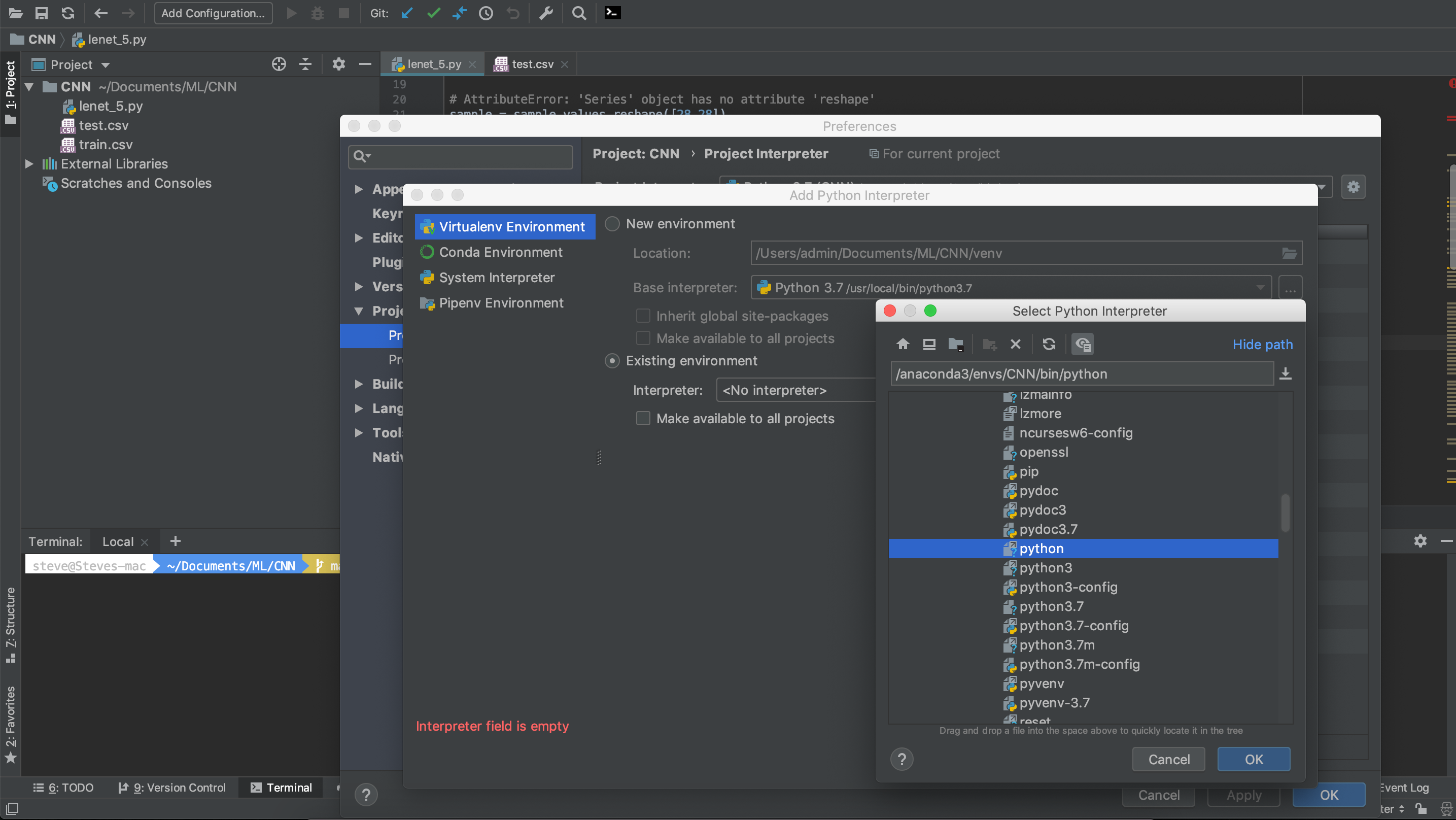
Apply anaconda env into PyCharm
- Mỗi một dự án đều cần được bọc bởi interpreter để lấy các thư viện ra và sử dụng từ trong interpreter đó. Nhiệm vụ bây là thay đổi interpreter măc định (môi trường máy tính global).
Bước 1: tạo interpreter bằng anaconda
- Có thể tạo interpreter environment bằng
conda create --name <env name>hoặc tạo bằng GUI của pyCharm
Bước 2: Adđ interpreter vào Project interpreter
a. Project interpreter => Add interpreter => Existing Environment
b. Pick anaconda3/envs/interpreter name/bin/python => Apply